یش نمایش کتاب خانه
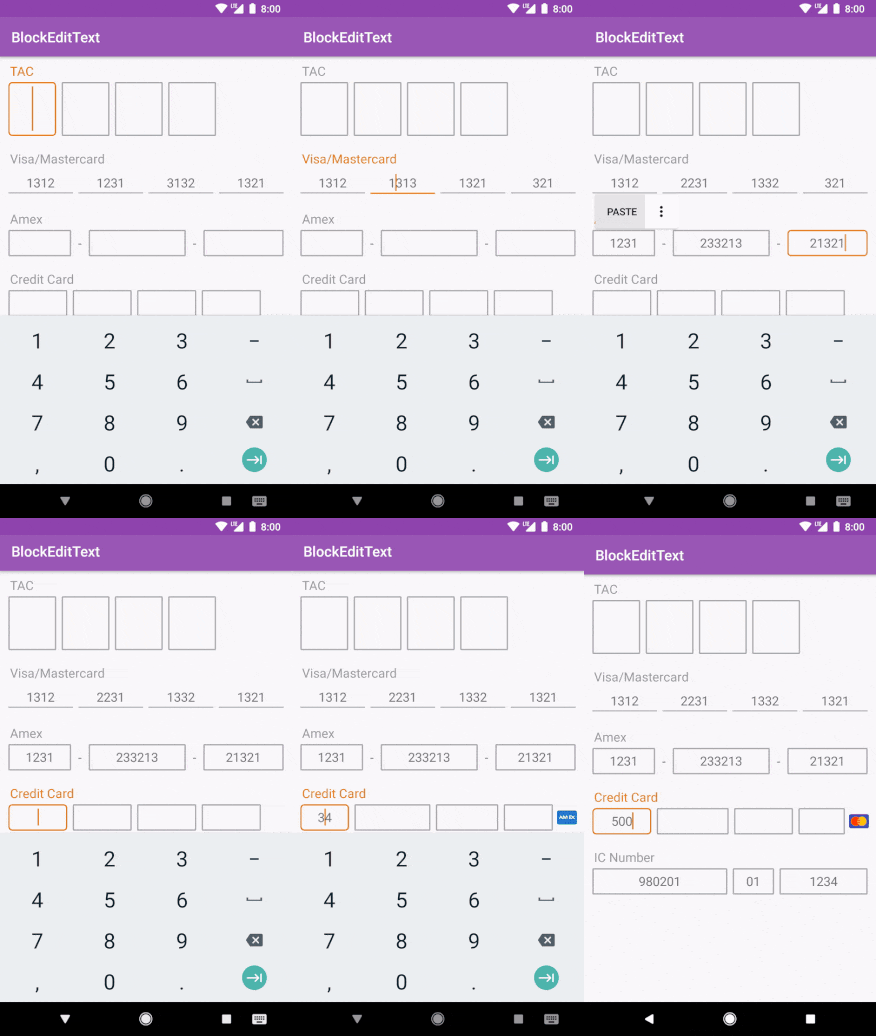
در حالت های مختلفی می توان از آن استفاده کرد.
ابتدا باید کتاب خانه مربوطه را اضافه کنید همانند زیر عمل کنید.
وارد فایل Build.gradle از نوع Top-Level شده سپس در بخش repositories خط زیر را اضافه کنید.
repositories {
 maven{
   url "https://dl.bintray.com/infideap2/Block-EditText"
 }
}
وارد فایل Build.gradle از نوع Module شده سپس در بخش dependencies خط زیر را اضافه کنید.
dependencies {
   implementation 'com.infideap.blockedittext:block-edittext:0.0.6'
}
<com.infideap.blockedittext.BlockEditText
    android:id="@+id/blockEditText_tac"
    app:bet_defaultLength="1"
    app:bet_numberOfBlock="4"
    app:bet_inputType="Integer"
    app:bet_hintTextAppearance="@style/TextAppearance.AppCompat.Medium"
    app:bet_hint="TAC"
    app:bet_textSize="24sp"
    android:layout_width="300dp"
    app:bet_editTextBackground="@drawable/selector_edittext_round_border"
    android:layout_height="wrap_content" />
Credit Card
<com.infideap.blockedittext.BlockEditText
    android:id="@+id/blockEditText_visa"
    android:layout_width="match_parent"
    android:layout_height="wrap_content"
    app:bet_defaultLength="4"
    app:bet_hint="Visa/Mastercard"
    app:bet_hintTextAppearance="@style/TextAppearance.AppCompat.Medium"
    app:bet_inputType="Integer"
    app:bet_numberOfBlock="4"
    app:bet_text="131321323-13213-21321312" />
در ادامه ویژگی یا Attributes های هرکدام را توضیح میدهیم.
app:bet_defaultLength : طول هر خانه از EditText ورودی را تعیین می کند.
app:bet_numberOfBlock : تعداد Block هایی که ساخته می شود را تعیین می کند.
app:bet_hint : یک Hint برای Block ها تعریف می کند.
app:bet_hintTextAppearance : اندازه از نظر مقایسی مربوط به hint را تعین می کند شامل medium , Large , samll می شود.
app:bet_inputType : تعیین نوع ورودی Edittext ها
app:bet_text : متن پیشفرض که در Edittext ها قرار میگیرد شما باید آن را حذف کنید.
app:bet_defaultLength : طول هر خانه از EditText ورودی را تعیین می کند.
app:bet_numberOfBlock : تعداد Block هایی که ساخته می شود را تعیین می کند.
app:bet_hint : یک Hint برای Block ها تعریف می کند.
app:bet_hintTextAppearance : اندازه از نظر مقایسی مربوط به hint را تعین می کند شامل medium , Large , samll می شود.
app:bet_inputType : تعیین نوع ورودی Edittext ها
app:bet_text : متن پیشفرض که در Edittext ها قرار میگیرد شما باید آن را حذف کنید.
اگر بخواهید از طریق کد آن را سفارشی کنید می توانید از نمونه کدهای زیر استفاده کنید.
amexEditText.setNumberOfBlock(3);
amexEditText.setDefaultLength(4);
amexEditText.setLengthAt(1,6);
amexEditText.setHint("Amex");
amexEditText.setText("1234567890");
amexEditText.getText();
amexEditText.setTextSize(16);
amexEditText.setHintTextSize(16);
amexEditText.setSeparatorTextSize(16);
amexEditText.setSeparatorCharacter('-');
amexEditText.setSeparatorPadding(8);
amexEditText.setInputType(InputType.TYPE_CLASS_NUMBER);
amexEditText.setTextAppearance(android.support.v7.appcompat.R.style.Base_TextAppearance_AppCompat_Medium);
amexEditText.setHintTextAppearance(android.support.v7.appcompat.R.style.Base_TextAppearance_AppCompat_Medium);
amexEditText.setSeparatorTextAppearance(android.support.v7.appcompat.R.style.Base_TextAppearance_AppCompat_Medium);
amexEditText.setEdiTextBackground(ContextCompat.getDrawable(this, R.drawable.selector_edittext_round_border_line));
amexEditText.setSelection(0);
amexEditText.addCardPrefix(CardPrefix.amex(this))
amexEditText.addCardPrefix(CardPrefix.amex(amexDrawable))
amexEditText.addCardPrefix(new CardPrefix(this, R.drawable.ic_amex, "34"))
amexEditText.addCardPrefix(new CardPrefix(amexDrawable, "34"))
و در نهایت برای اینکه آن را findViewbyid کنید می توانید مثل زیر عمل کنید.
BlockEditText amexEditText = findViewById(R.id.blockEditText_amex);
این آموزش هم به پایان رسید.
موفق و پیروز باشید.